Why this week matters
In Weeks 3–5, we learned how to acquire, combine, reshape, filter, and validate data. This week asks what comes next:
How do we use visualization to understand data before formal modeling, and how do we communicate those patterns clearly?
The approved STA 556 schedule identifies Week 6 as Exploratory Data Analysis & Visualization, including:
the Grammar of Graphics concept;
visualizing continuous and categorical data;
customizing aesthetics;
publication-quality visualization.
Visualization is part of statistical reasoning. A good visualization can reveal distributional shape, unusual observations, group differences, nonlinear relationships, heteroscedasticity, missingness, and data-quality problems.
1. Exploratory Data Analysis
Exploratory Data Analysis (EDA) is the process of investigating data before or alongside formal modeling.
Question
   ↓
Inspect data
   ↓
Summarize
   ↓
Visualize
   ↓
Identify patterns / anomalies
   ↓
Ask better questions
   ↓
Model
EDA is iterative. The first visualization often generates the next question rather than providing the final answer.
2. Why visualize?
Numerical summaries are essential, but they can hide:
clusters;
curvature;
outliers;
gaps;
ceiling effects;
nonconstant variance.
This is the central lesson behind Anscombe’s quartet: datasets can share nearly identical numerical summaries but have very different visual structures.
Numerical summaries and graphics should complement one another.
3. Start with variable type
Before selecting a plot, identify the variables involved.
Categorical
├── nominal
└── ordinal

Numeric
├── discrete
└── continuous
Instead of asking:
What plot should I use?
ask:
What variables am I comparing, and what do I want to learn about them?
4. One continuous variable
Useful displays include:
histogram;
density plot;
boxplot;
empirical cumulative distribution;
rug plot.
Questions include:
Where is the center?
How variable is it?
Is the distribution symmetric?
Are there multiple modes?
Are there unusual observations?
5. Histograms
import matplotlib.pyplot as plt

plt.hist(
    df["score"],
    bins=10
)

plt.show()
Histograms approximate a distribution by dividing a continuous range into bins and counting observations in each bin.
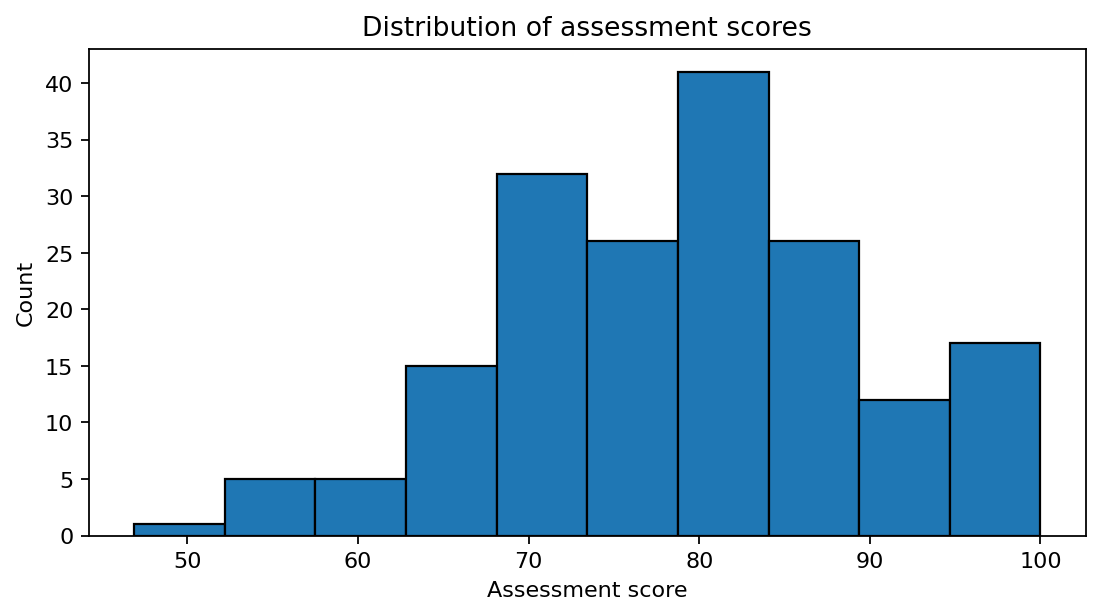
Example: a histogram reveals the overall distribution of a continuous variable.
6. Bin width matters
Compare:
plt.hist(df["score"], bins=5)with:
plt.hist(df["score"], bins=30)Too few bins can hide structure. Too many bins can emphasize random variation.
Do not treat a default bin choice as statistically authoritative.
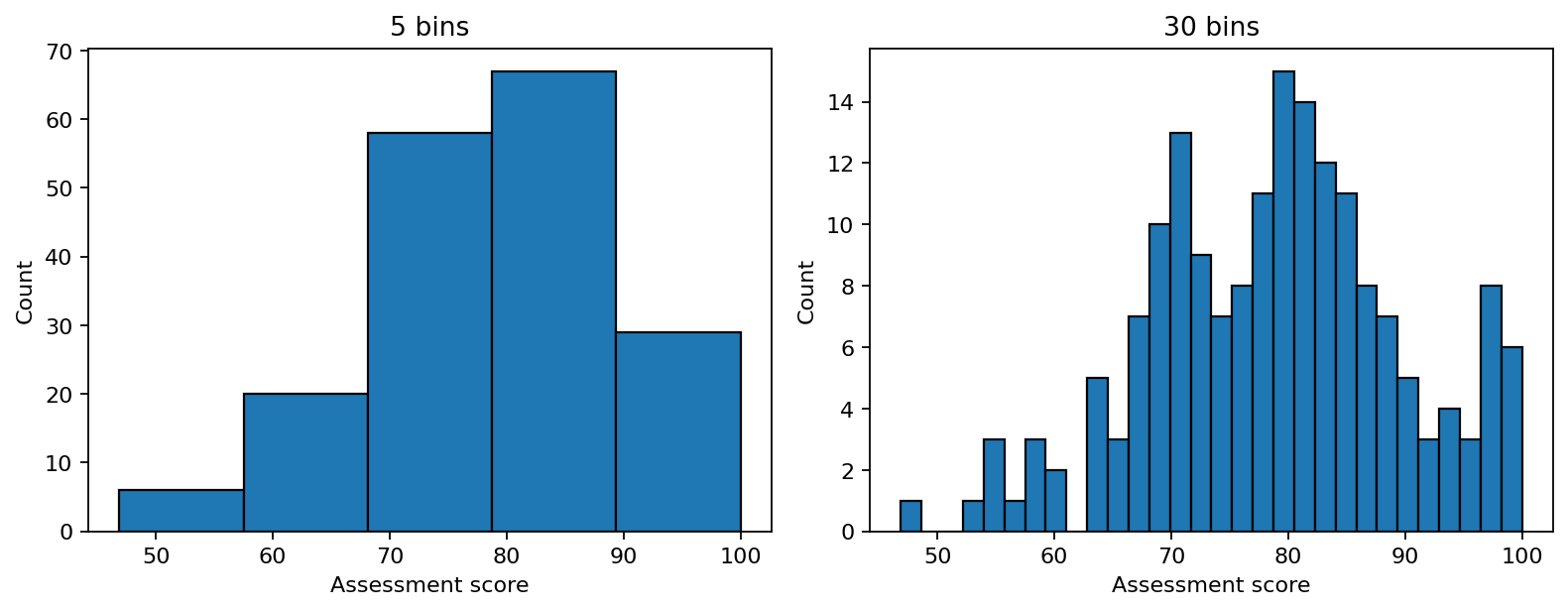
The same data can look different under different bin choices.
7. Density plots
With seaborn:
import seaborn as sns

sns.kdeplot(
    data=df,
    x="score"
)
A density curve is a smoothed estimate rather than the raw observations. Its appearance depends on smoothing choices.
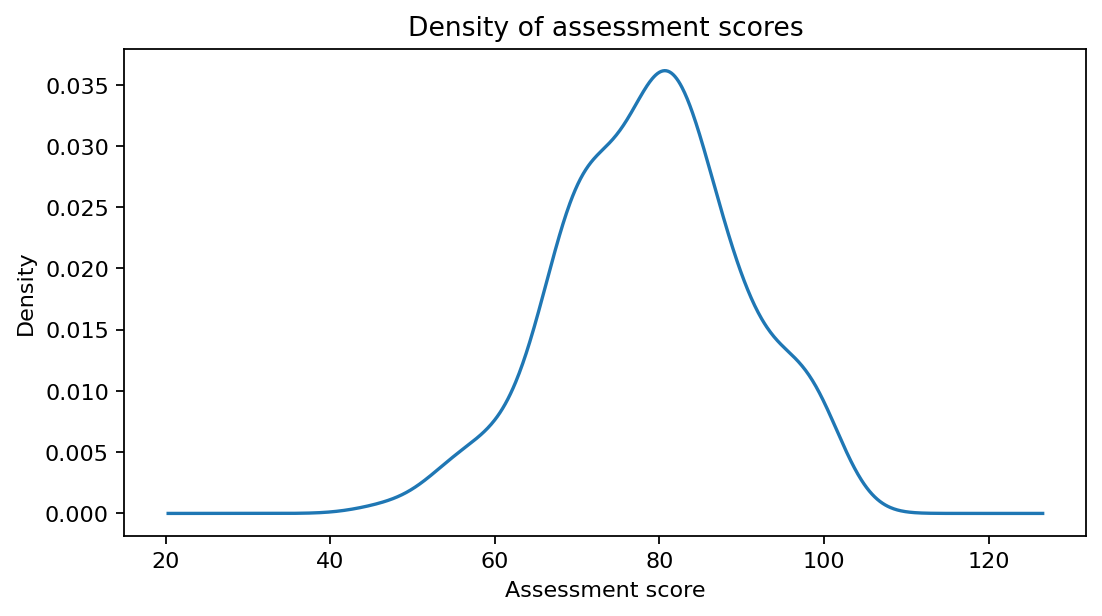
Density plots emphasize smoothed distributional shape rather than individual observations.
8. Boxplots
sns.boxplot(
    data=df,
    x="group",
    y="score"
)
A boxplot summarizes:
median;
quartiles;
interquartile range;
potential outlying observations.
Boxplots are useful for group comparisons but hide distributional detail. When possible, combine summaries with individual observations.
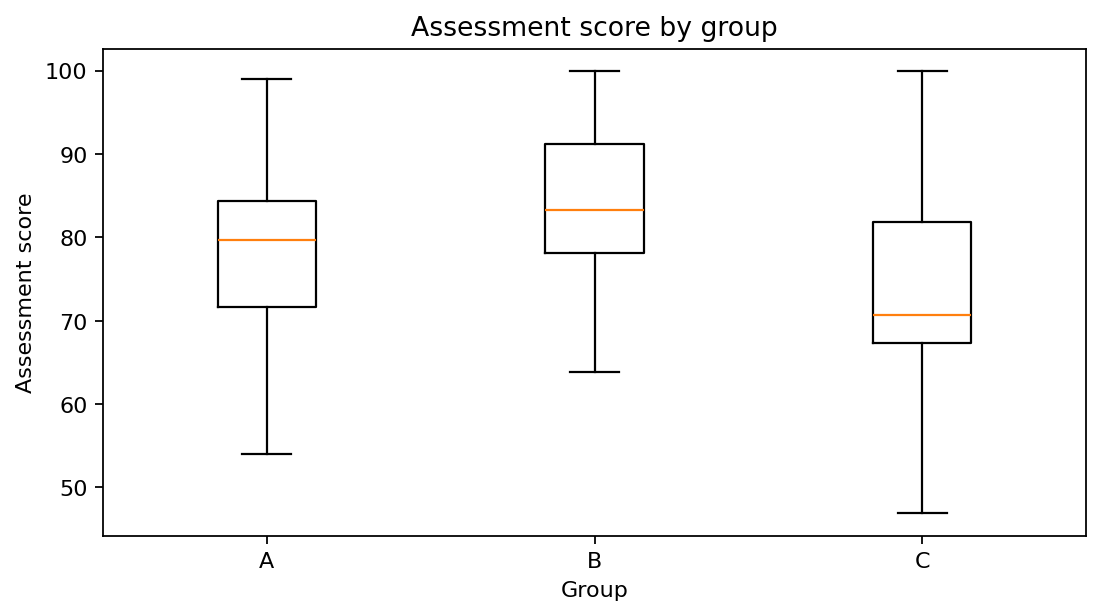
Boxplots summarize center, spread, and possible outliers across groups.
9. One categorical variable
Start with counts or proportions:
df["group"].value_counts()Visualize:
sns.countplot(
    data=df,
    x="group"
)
For categorical variables, bar heights should normally represent counts or meaningful summaries.
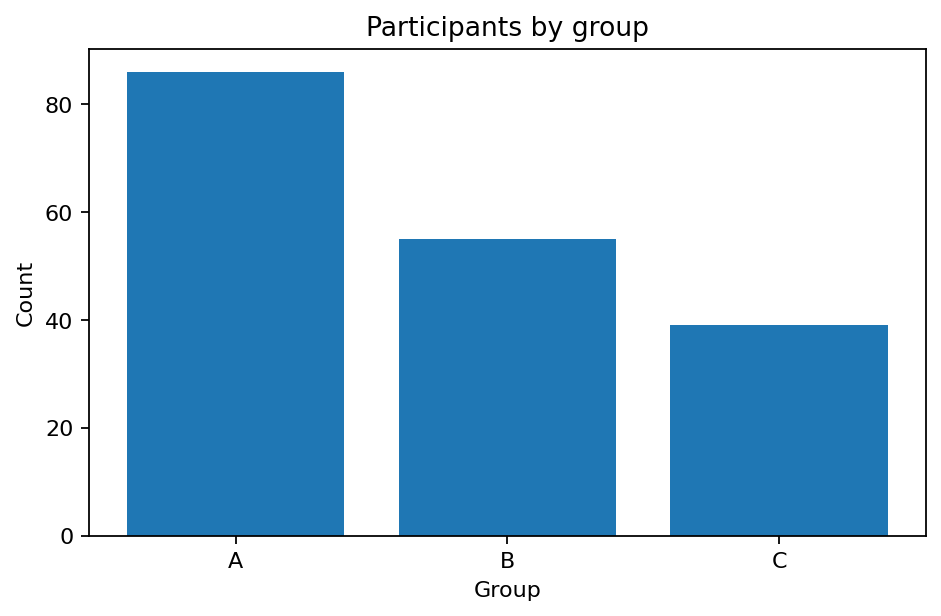
For a categorical variable, counts or proportions are a natural starting point.
10. Two continuous variables
The default exploratory display is often a scatterplot:
sns.scatterplot(
    data=df,
    x="age",
    y="score"
)
Ask:
Is there an association?
Is it linear?
Are there clusters?
Does variance change with x?
Are there outliers?
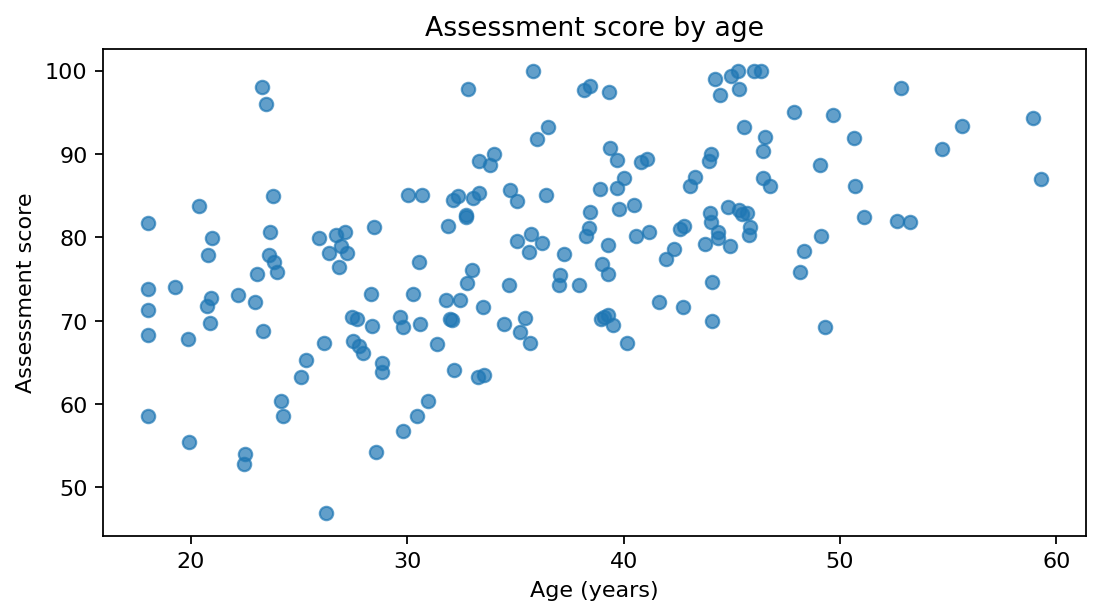
Scatterplots reveal form, strength, clusters, changing variance, and unusual observations.
11. Correlation is not the plot
df[["age", "score"]].corr()A correlation coefficient summarizes one aspect of association, but similar correlations can accompany very different visual patterns.
Always inspect a relationship visually before interpreting a correlation coefficient.
12. Continuous vs. categorical
Useful displays include:
boxplot
violin plot
strip plot
swarm plot
grouped density plot
For example:
sns.boxplot(
    data=df,
    x="group",
    y="score"
)
and:
sns.stripplot(
    data=df,
    x="group",
    y="score"
)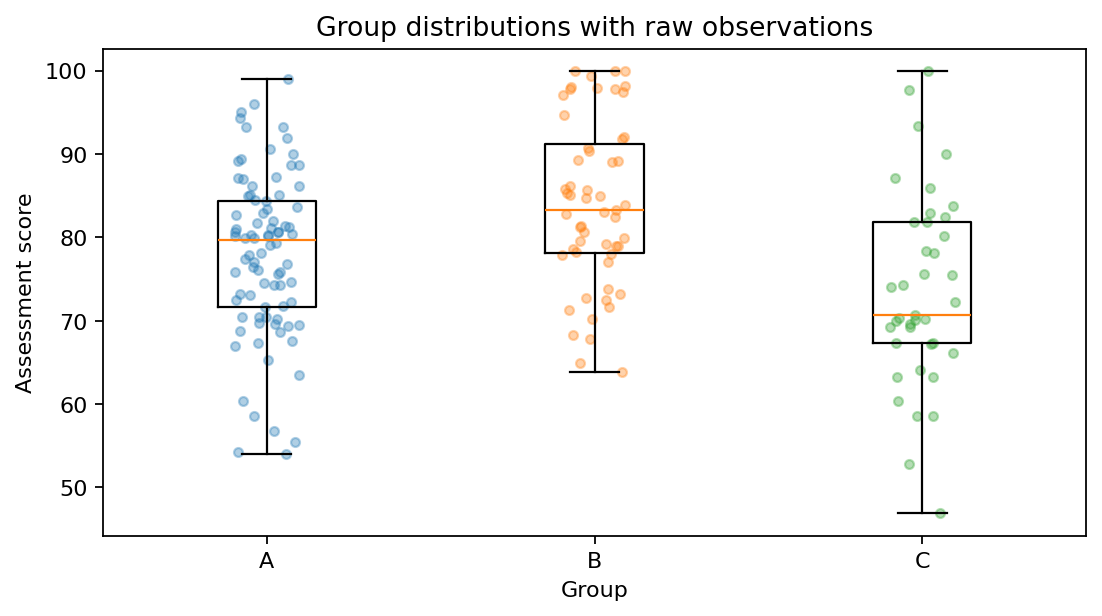
The boxplot summarizes each group; the overlaid points show the observations that produced that summary. Here the additional structure is modest, but in other datasets raw points can reveal clusters, gaps, or small sample sizes.
13. Two categorical variables
Start with a contingency table:
pd.crosstab(
    df["group"],
    df["outcome"]
)
Possible graphics include grouped bars, stacked bars, or a heatmap of counts/proportions.
14. The Grammar of Graphics
The Grammar of Graphics treats a statistical graphic as a structured combination of components:
data
+
variables
+
aesthetic mappings
+
geometric objects
+
scales
+
coordinate system
+
facets
+
theme
Instead of thinking only in terms of named chart types, we think about how data are encoded visually.
15. Aesthetic mappings
An aesthetic is a visual property onto which a variable can be mapped.
Examples:
x position
y position
color
size
shape
opacity
For example:
age   → x
score → y
group → color
A mapped aesthetic represents data.
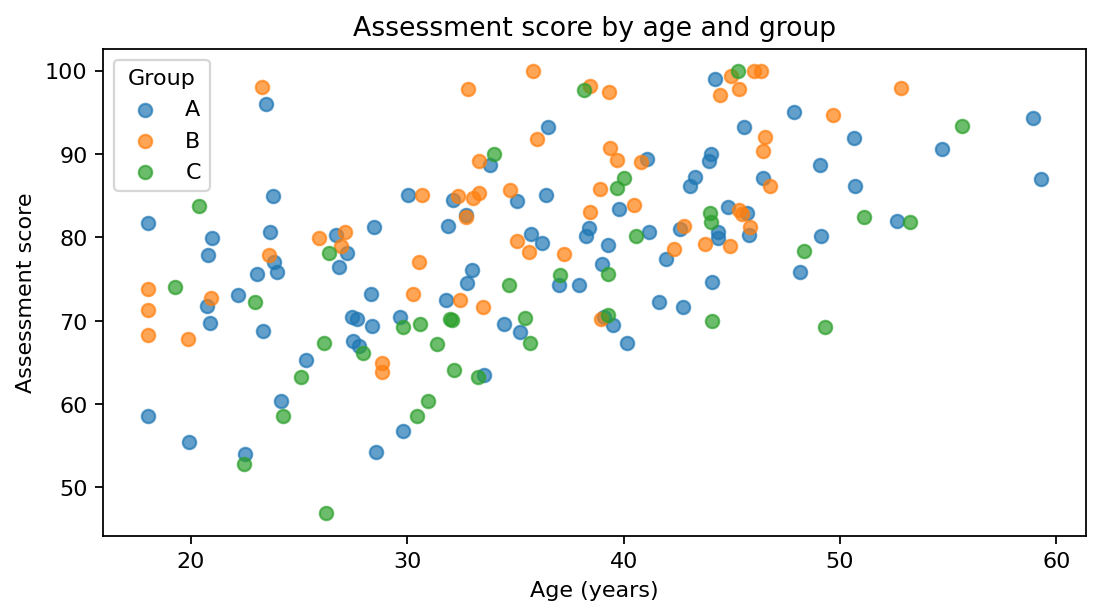
Here color encodes the categorical variable group rather than merely styling the figure.
16. Geometries
A geometric object determines how observations are drawn.
Examples:
point
line
bar
boxplot
histogram
density
The same variables can sometimes be represented with different geometries, depending on the analytical goal.
17. Grammar of Graphics in Python
plotnine provides a grammar-of-graphics interface in Python.
from plotnine import (
    ggplot,
    aes,
    geom_point
)

(
    ggplot(
        df,
        aes(
            x="age",
            y="score"
        )
    )
    + geom_point()
)
Read this as:
Take df
map age to x
map score to y
draw points
18. Mapping vs. setting
Mapped:
aes(color="group")means color represents a variable.
Set:
geom_point(color="black")means every point receives the same fixed color.
Mapped aesthetics encode data. Set aesthetics style the plot.
19. Layers
Grammar-based graphics are layered.
from plotnine import geom_smooth

(
    ggplot(
        df,
        aes(
            x="age",
            y="score"
        )
    )
    + geom_point()
    + geom_smooth()
)
Conceptually:
data + points + smoothEach layer contributes information.
20. Faceting
from plotnine import facet_wrap

(
    ggplot(
        df,
        aes(
            x="age",
            y="score"
        )
    )
    + geom_point()
    + facet_wrap("group")
)
Faceting creates separate panels for subsets of the data and is often clearer than adding more visual encodings to a crowded figure.
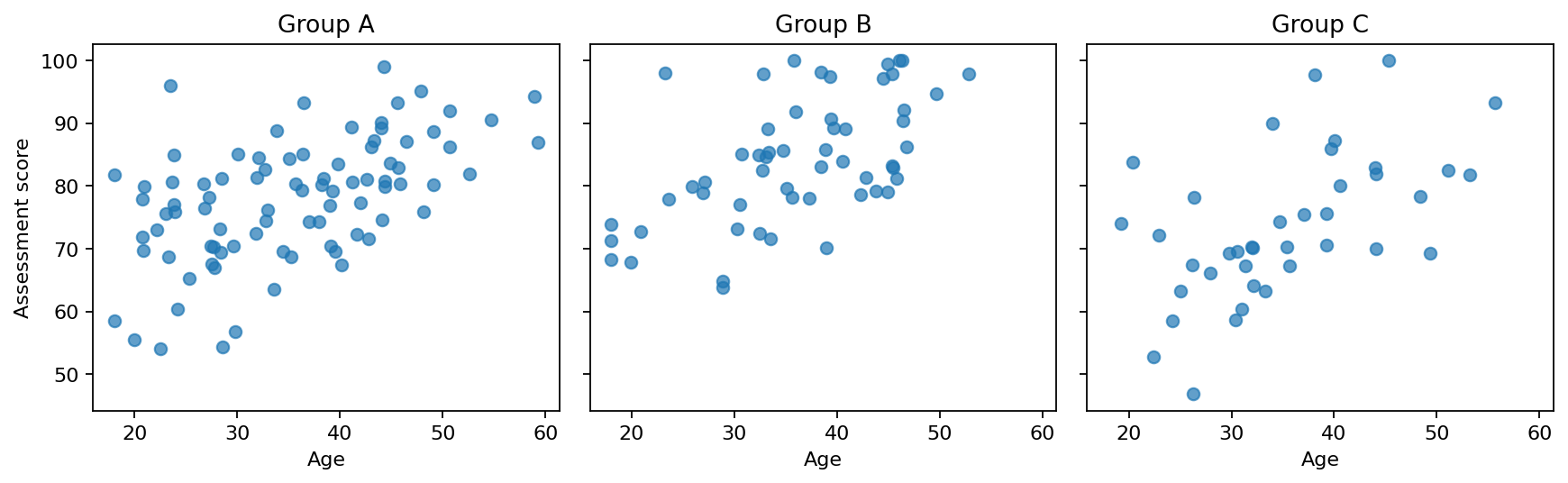
Faceting separates groups into panels and can reduce visual crowding.
21. Matplotlib, seaborn, and plotnine
matplotlib
Low-level and highly customizable.
plt.scatter(x, y)seaborn
Higher-level statistical visualization built on matplotlib.
sns.scatterplot(
    data=df,
    x="age",
    y="score",
    hue="group"
)plotnine
Explicit Grammar of Graphics implementation.
ggplot(df, aes(...)) + geom_point()These tools are complementary rather than mutually exclusive.
22. Titles, labels, and units
A figure should communicate without requiring the reader to inspect the code.
Prefer:
Age (years)
Time (seconds)
Distance (km)
over vague labels such as age, time, or distance.
Example:
ax = sns.scatterplot(
    data=df,
    x="age",
    y="score"
)

ax.set(
    title="Participant score by age",
    xlabel="Age (years)",
    ylabel="Assessment score"
)
23. Color should encode information
Color can distinguish groups, highlight observations, or represent continuous quantities.
Ask:
What information does this color encode?
If the answer is “nothing,” it may not be needed.
Also consider accessibility: color should not be the only cue when important categories must remain distinguishable.
24. Avoid misleading axes
A truncated axis can exaggerate differences.
For bar charts, a zero baseline is usually important because bar length encodes magnitude.
For other plots, zero is not always required.
Choose scales that represent the statistical comparison honestly.
25. Avoid chartjunk
Potential distractions include:
3D effects
heavy backgrounds
excessive grid lines
decorative icons
unnecessary colors
The goal is not minimalism for its own sake. The goal is to make the data easier to interpret.
26. Publication-quality figures
A publication-quality figure should have:
readable labels;
meaningful units;
appropriate font sizes;
clear legends;
sensible scales;
appropriate aspect ratio;
sufficient resolution;
consistent formatting.
fig, ax = plt.subplots(
    figsize=(7, 5)
)

sns.scatterplot(
    data=df,
    x="age",
    y="score",
    hue="group",
    ax=ax
)

ax.set(
    title="Assessment score by age",
    xlabel="Age (years)",
    ylabel="Assessment score"
)

fig.tight_layout()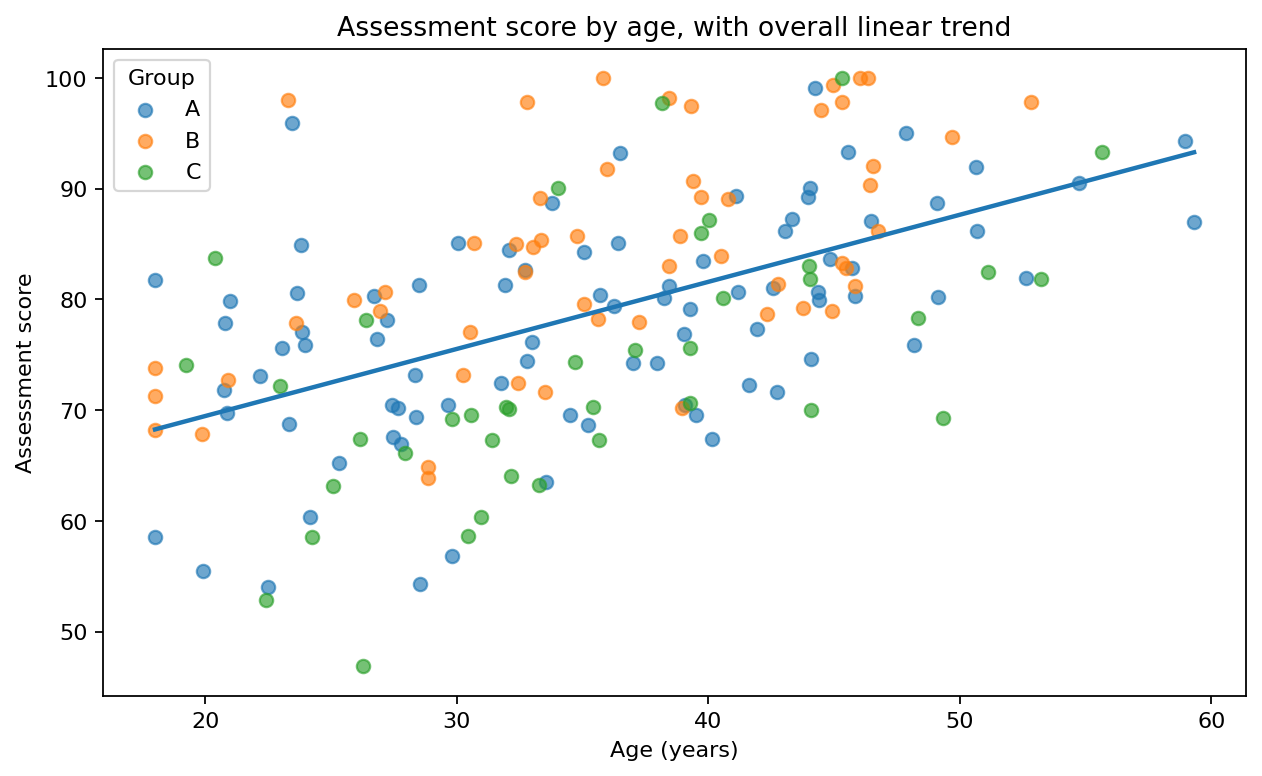
Example of a more deliberate communication figure with meaningful labels, legend, and title.
27. Save figures deliberately
fig.savefig(
    "figures/score_by_age.png",
    dpi=300,
    bbox_inches="tight"
)
Common formats:
PNG → raster
PDF → vector
SVG → vector
The best format depends on the destination.
28. EDA plots vs. communication plots
An exploratory plot may be quick and minimally styled.
A final communication figure may require:
meaningful labels;
annotations;
deliberate scales;
intentional color;
cleaner styling;
appropriate resolution.
Do not fully polish every exploratory plot, but do not treat a default exploratory plot as a final scientific figure.
29. Show raw data when possible
A boxplot alone hides individual observations.
Consider combining:
sns.boxplot(
    data=df,
    x="group",
    y="score"
)

sns.stripplot(
    data=df,
    x="group",
    y="score"
)
Raw observations can reveal sample size, clustering, gaps, and unusual values.
30. Visualization can reveal data problems
A histogram may reveal:
age = 999A category plot may reveal:
Male
male
M
MALE
Visualization is part of data validation and cleaning, not just final reporting.
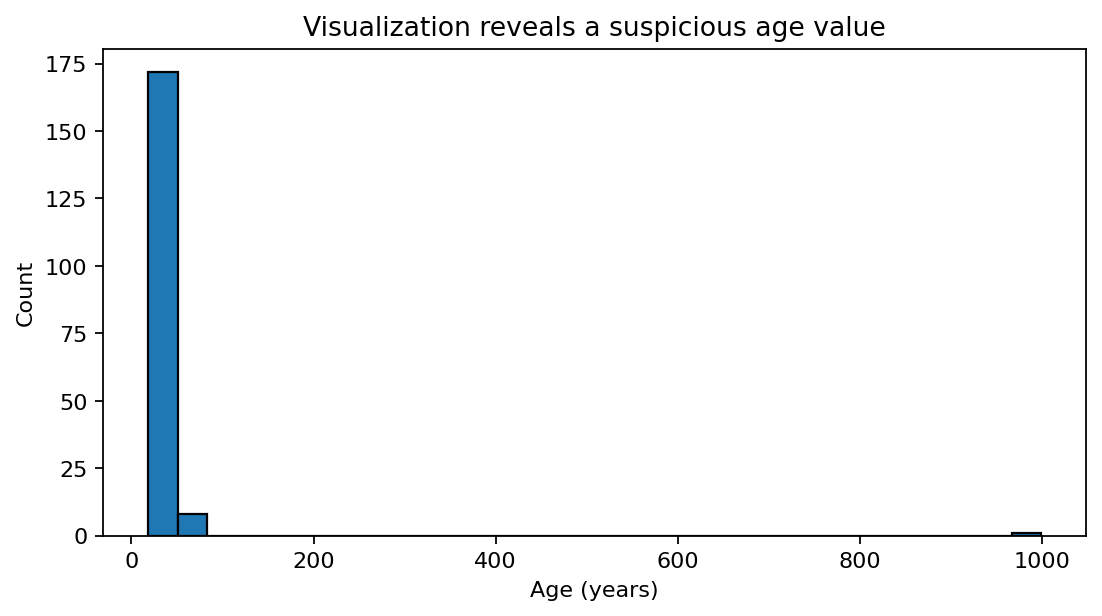
The isolated value near 999 is immediately visible and should trigger investigation.
31. Avoid overplotting
With many observations, scatterplots may become dense.
Strategies include:
smaller markers;
transparency;
hexbin plots;
two-dimensional densities;
sampling;
aggregation.
Example:
sns.scatterplot(
    data=df,
    x="x",
    y="y",
    alpha=0.3
)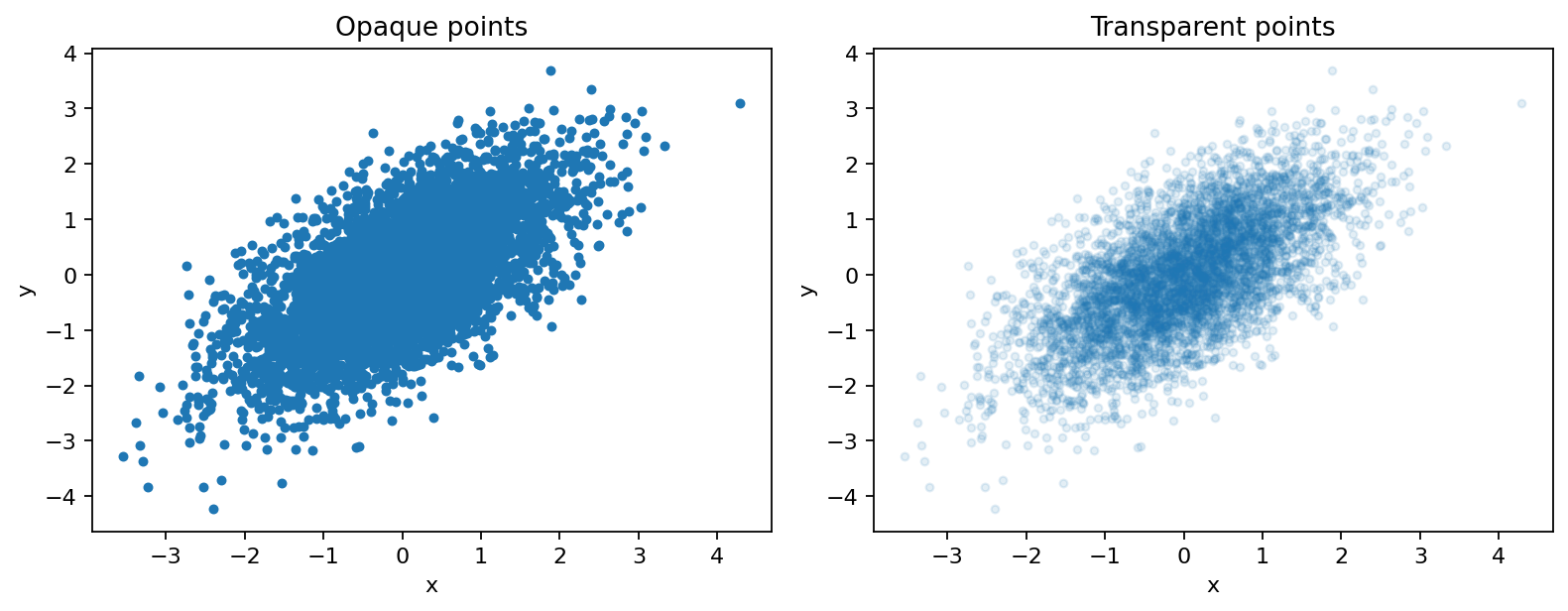
Transparency can reveal density when many observations overlap.
32. Statistical uncertainty
A visualization can include uncertainty through:
confidence intervals
standard errors
prediction intervals
sampling variability
Be explicit about what an interval represents. Not every shaded band has the same interpretation.
33. Visualization checklist
Statistical
Does this plot answer the intended question?
Are the variables represented appropriately?
Are important observations hidden?
Does the scale distort the pattern?
Communication
Is the title informative?
Are axes labeled with units?
Is the legend necessary and clear?
Is the figure readable without the code?
Reproducibility
Is the figure generated entirely from code?
Is the output saved systematically?
Can it be regenerated from the source data?
34. Key ideas
By the end of Week 6, you should be able to explain:
The role of visualization in EDA.
Why numerical summaries and plots complement one another.
How variable type guides plot choice.
Appropriate displays for continuous and categorical variables.
Why histogram binning matters.
How scatterplots expose relationships between continuous variables.
What the Grammar of Graphics means.
The roles of data, aesthetics, geometries, scales, and facets.
Mapping vs. setting an aesthetic.
The roles of matplotlib, seaborn, and plotnine.
Why labels, units, scales, and color choices matter.
How to produce publication-quality graphics.
Why exploratory and communication plots have different goals.
How visualization can identify data-quality problems.
35. Recommended reading
Python Data Science Handbook — Visualization with Matplotlib
https://
seaborn tutorial
https://
plotnine documentation
Fundamentals of Data Visualization — Claus O. Wilke
https://
36. YouTube recommendations
1. Posit — “Grammar of Graphics in Python with Plotnine”
This conference talk introduces the Grammar of Graphics and demonstrates how plotnine brings a grammar-based approach into Python. It is especially useful for understanding visualization as a composition of data, mappings, geometries, and layers.
Recommended use: Watch alongside the Grammar of Graphics sections of these notes.
2. Real Python — “Graphing Your Data Like ggplot in Python With plotnine”
A practical introduction to using plotnine to construct statistical graphics in Python. It reinforces aesthetic mappings, geometries, and layered plotting.
Recommended use: Watch before or after the plotnine exercises in the tutorial.
3. Corey Schafer — Matplotlib Tutorials
Corey Schafer’s matplotlib material is a useful practical complement to the higher-level Grammar of Graphics perspective, particularly for students who want more control over figure objects, axes, labels, and export.
Recommended use: Optional extension for producing polished matplotlib figures.
Find the Matplotlib tutorials on YouTube
37. Week 6 takeaway
A statistical visualization is an argument about data expressed through visual encodings.
Statistical question
       ↓
Identify variable types
       ↓
Choose visual encodings
       ↓
Construct plot
       ↓
Inspect patterns
       ↓
Revise question / analysis
       ↓
Refine communication
       ↓
Save reproducible figure
Next week we move into Modular Programming & Functions, including pure functions, variable scope, and functional programming patterns.